
Download Nolibox Creator – Free AI Art Tool for Windows, Mac, Android & iOS
Unlock your creative potential with Nolibox Creator, a powerful, free, and secure AI art tool that brings the future of digital creativity to your fingertips. Designed for artists, designers, and hobbyists alike, Nolibox leverages the open-source carefree-creator backend to deliver a seamless, web-based experience with no installation required. Whether you're generating stunning txt2img artwork, refining images with HD erase & replace, or experimenting with inpaint and outpaint features, Nolibox makes advanced AI tools accessible to everyone.
With support for multiple models—including General, Realistic, and Anime—users can customize their output to match their artistic vision. The platform’s intuitive interface ensures a smooth learning curve, even for beginners. Plus, enjoy free access to features like auto arrangement, circular texture generation, and negative prompts for precise control.
Nolibox Creator is compatible with Windows, Mac, Android, and iOS devices, making it a truly cross-platform solution. Explore endless creative possibilities, share your masterpieces instantly, and stay updated with real-time tips and direct support—all from a secure, ad-free environment.
Explore Infinite Creativity with Nolibox Creator’s Advanced AI Features
At the heart of Nolibox Creator lies a rich suite of AI-powered tools that empower users to push the boundaries of digital art. One of the standout features is Text-to-Image (Txt2Img), allowing you to generate high-quality visuals simply by typing a description. Whether you're envisioning a cyberpunk cityscape or a whimsical forest fairy, Nolibox transforms your words into vivid, detailed images in seconds. For those looking to refine or modify existing artwork, the VariationImg2Img function enables you to tweak an image while preserving its core elements—perfect for exploring different artistic interpretations without starting from scratch.
Another game-changing feature is HD Erase & Replace, which lets you remove unwanted objects from your images with surgical precision and seamlessly replace them with AI-generated content. This is ideal for editing photos or enhancing artwork without manual retouching. Similarly, Inpaint and Outpaint allow you to fill in missing areas or extend the canvas beyond the original image boundaries, making it easy to create panoramic scenes or fix image imperfections. The Negative Prompt functionality adds another layer of control, helping you exclude specific elements from your output—like unwanted shadows or distorted limbs—ensuring cleaner, more accurate results.
For professional-grade editing, Nolibox includes Matting, which accurately separates subjects from backgrounds, enabling effortless compositing. The platform also supports custom model selection, so you can switch between General, Realistic, Anime, and other specialized models based on your project’s needs. Whether you're designing characters, creating textures, or building concept art, Nolibox’s diverse toolset ensures you have the right AI assistant at every stage of your creative journey. All features are available in a single, intuitive web interface—no downloads, no complexity.
Seamless Installation, Cross-Platform Compatibility & Easy Usage
One of the most appealing aspects of Nolibox Creator is its zero-installation requirement. Unlike traditional software that demands downloads, updates, or system compatibility checks, Nolibox operates entirely in your browser. This means you can access the platform from any device with an internet connection—whether it’s a Windows PC, Mac, Android tablet, or iOS smartphone. No need to worry about disk space, system requirements, or complex setup processes. Simply visit the official website, sign up (if desired), and start creating immediately.
For users who prefer a more permanent presence, Nolibox also offers a progressive web app (PWA) experience. By adding the app to your home screen on mobile or desktop, you can launch it like a native app—complete with offline access to recent projects and faster load times. This flexibility makes Nolibox ideal for artists on the go, students working from different devices, or professionals managing multiple creative workflows.
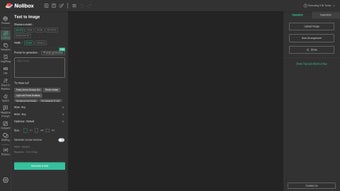
Using Nolibox is as simple as typing a prompt and clicking a button. The interface is clean, well-organized, and logically structured. You’ll find your favorite tools in a sidebar, with real-time previews and adjustable sliders for parameters like strength, steps, and CFG scale.
The platform also includes a built-in tutorial system with helpful tips and examples, guiding you through each feature. Whether you’re a beginner exploring AI art for the first time or an experienced creator seeking advanced tools, Nolibox adapts to your skill level. Plus, with automatic updates, you always have access to the latest features and performance improvements—no manual intervention needed.
Pros and Cons: Is Nolibox Creator Right for You?
- Pros:
- Completely free to use with no hidden fees
- Web-based—no installation, no downloads
- Supports multiple AI models: General, Real, Anime, and more
- Advanced features: HD Erase & Replace, Inpaint, Outpaint, Matting
- Intuitive interface suitable for beginners and pros
- Available on Windows, Mac, Android, and iOS
- Secure, ad-free, and privacy-focused environment
- Auto arrangement and circular texture generation for creative layouts
- Cons:
- Requires a stable internet connection for full functionality
- Web-based processing may be slower than local software (depending on bandwidth)
- Advanced features may require learning curve for absolute beginners
- No offline mode for full project editing (though PWA helps)
- Limited customization for model fine-tuning (compared to local AI tools)
Frequently Asked Questions (FAQ)
Conclusion: Elevate Your Creative Journey with Nolibox Creator
With its powerful blend of AI innovation, user-friendly design, and cross-platform accessibility, Nolibox Creator stands out as one of the most promising free tools for digital artists and creatives. Whether you’re generating imaginative artwork, editing photos, or designing textures, Nolibox delivers professional-grade results without the steep learning curve or high costs associated with other software. Its extensive feature set—ranging from txt2img and inpaint to HD erase & replace and matting—ensures you have everything you need to bring your ideas to life.
Best of all, you can start creating today—no downloads, no registration required. Simply visit the official website, choose your model, enter a prompt, and watch your vision unfold. The platform’s continuous updates and strong community support make it a future-proof choice for anyone passionate about creative expression.
Ready to unlock your imagination? Download Nolibox Creator now and begin your journey into the world of AI-powered artistry—free, secure, and instantly accessible.



.png)



